Your cycling coach. Roasting included.
TrainerRoast builds a season plan for your goal ride, reads your rides from Strava in your AI chat, and tells you honestly how they went.
Works with the Strava connector in Claude (a Strava subscription is required). Your plan stays on your computer.
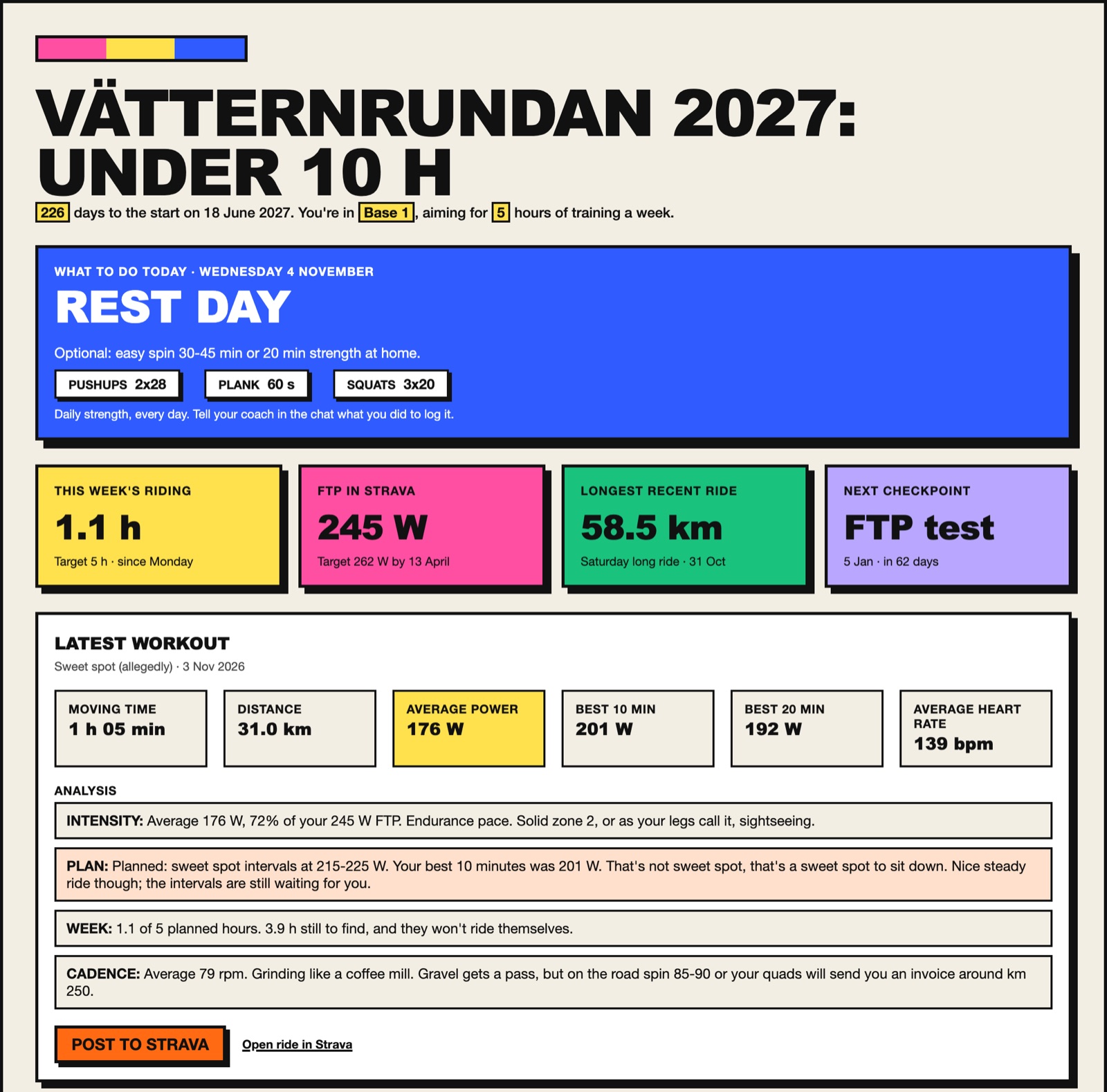
“Your best 10 minutes was 201 W. That's not sweet spot, that's a sweet spot to sit down.”TrainerRoast, on a ride called “Sweet spot (allegedly)”
How it works
TrainerRoast plugs into Claude as a set of tools. You talk to it like you'd talk to a coach.
Install it
Double-click the download in Claude desktop, or add it to Claude Code with one command.
Connect Strava
Turn on the Strava connector under Settings → Connectors. That's how your rides reach the chat.
Tell it your goal
Name your event, date and current FTP. TrainerRoast builds the plan and checks in from there.
“Set me up for a 160 km gran fondo on 12 June.”What it does
One goal event, one season, and a coach who actually looks at the numbers.
A season plan
Base, Build, Specific and Taper phases worked back from your event date, with recovery weeks and a Christmas break.
Today's session
Ask what's on today and get the session with real watt targets, not “ride a bit harder”.
Watts that follow your FTP
Every target is set as a share of your FTP. Do an FTP test and the whole plan updates.
The roast
An honest, good-natured verdict on your latest ride against the plan. Paste it into Strava if you dare.
Strength log
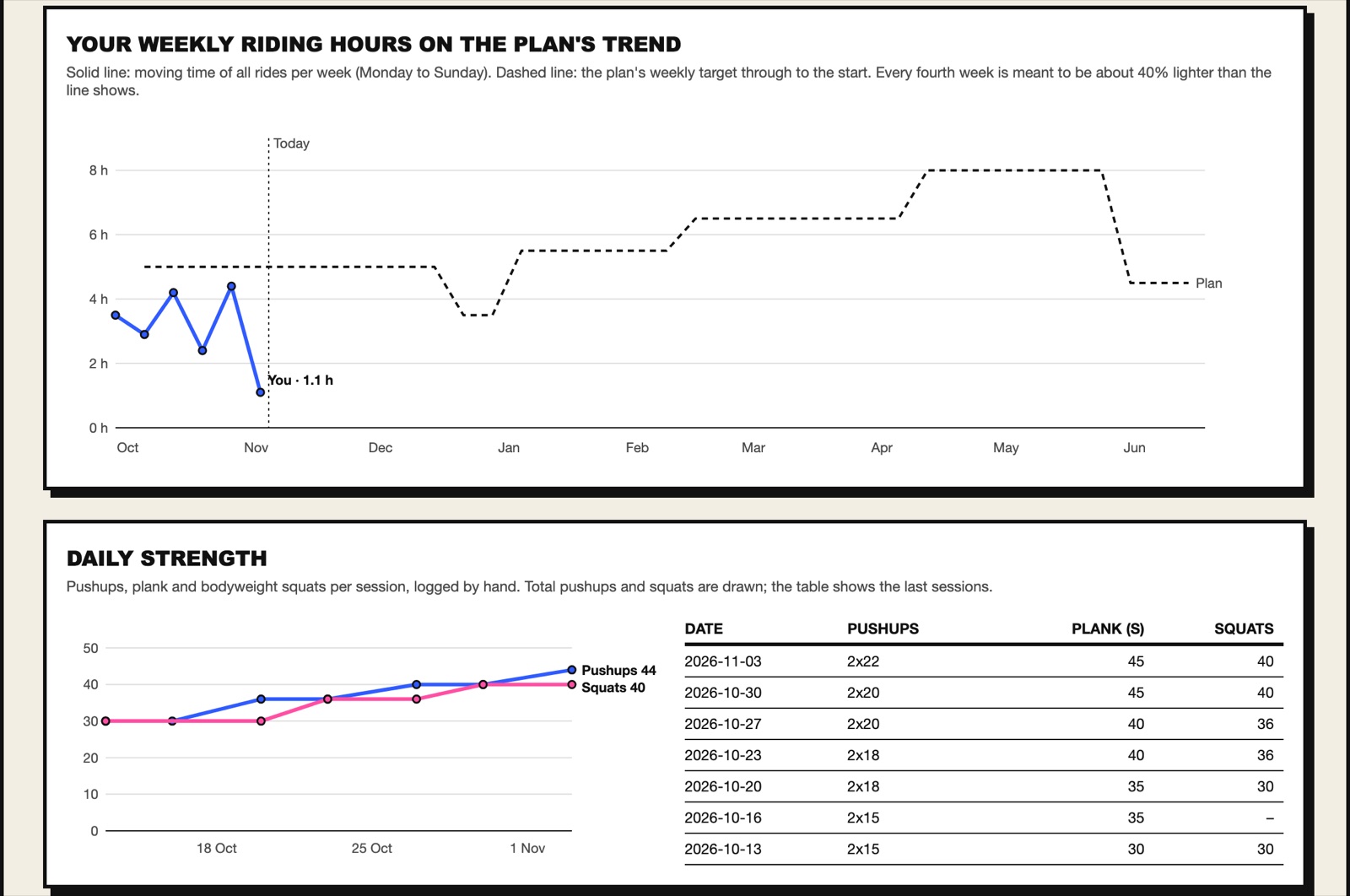
Say “2x25 pushups, 50 s plank” and it's logged, with two-week targets that grow with you.
A training dashboard
Weekly hours against the plan, FTP, checkpoints and recent rides on one page in your browser.
Install
Pick the Claude you use. All three install the same TrainerRoast.
Claude desktop
Download the extension and double-click it. Claude asks you to confirm, and that's it.
Download .mcpbOr drag the file into Settings → Extensions.
Claude Code
Run this in your terminal. Needs Node.js 20 or newer.
Config file
For any MCP client that runs local servers, e.g. Claude desktop's claude_desktop_config.json.
Then turn on the Strava connector in Claude and say: “Set me up for <your event>.” The dashboard opens in your browser at 127.0.0.1:4517.
Your data stays yours
TrainerRoast runs on your own computer. There's no account and nothing to sign up for.
- Your plan, strength log and FTP history are saved in one file on your computer (
~/.trainerroast). - TrainerRoast never connects to Strava itself. Rides come from your own Strava connector, inside your chat.
- The dashboard is served only to your own machine, not to the internet.
- MIT licensed, and free.
Questions
Does it cost anything?
TrainerRoast is free. You need Claude, and the Strava connector in Claude needs a Strava subscription.
Does it work in ChatGPT?
Not yet. ChatGPT only connects to hosted servers, and a hosted TrainerRoast is on the way.
Can I use it without Strava?
Yes. The plan, strength log and FTP tracking work on their own, and you can tell Claude about your rides yourself.
Why does the dashboard open in my browser?
Claude only shows app pages inside the chat for hosted connectors. Until the hosted version is out, TrainerRoast serves the same dashboard on your own computer and Claude gives you the link.
Is the roasting mean?
It's honest, not mean. It'll tell you your sweet spot ride was a café ride with ambitions, then tell you what to do about it.